
• Home
  • Notes
    • Online Courses
      • 12th Class
      • 11th Class
      • 10th Class
      • 9th Class
  • Jobs
    • PPSC Jobs
    • SPSC Jobs
    • Punjab Police Jobs
  • Education News
  • E-Books
    • Punjab Text Book (PTB)
  • Model Papers
  • Results
  • Admissions
  • Colleges
  • More
    • Paper Schemes
    • Date Sheets
    • Guess Papers
    • Roll No Slips
Facebook Twitter
Trending
  • NADRA Islamabad Announced Latest April Jobs 2024
  • TEVTA Sargodha Announced Instructor / Clerk Jobs 2024
  • BPSC Announced Latest Jobs Through Advertisement no. 03/2024
  • All Subjects 12th Class Paper Scheme 2024 | Punjab Board
  • 12th Class Computer Science Paper Scheme 2024 Punjab Board
  • 9th Class Pakistan Studies Guess Papers 2024 Punjab Board
  • 12th Class Biology Paper Pairing Scheme 2024 Punjab Board
  • Physics 12th Class Paper Scheme 2024 Punjab Board
  • Home
  • Notes
    • Online Courses
      • 12th Class
      • 11th Class
      • 10th Class
      • 9th Class
  • Jobs
    • PPSC Jobs
    • SPSC Jobs
    • Punjab Police Jobs
  • Education News
  • E-Books
    • Punjab Text Book (PTB)
  • Model Papers
  • Results
  • Admissions
  • Colleges
  • More
    • Paper Schemes
    • Date Sheets
    • Guess Papers
    • Roll No Slips
Home » Computer Science » How to do Exponents in Java – 3 Different Methods
Computer Science

How to do Exponents in Java – 3 Different Methods

January 12, 20202 Comments3 Mins Read
WhatsApp Facebook Twitter Pinterest LinkedIn Tumblr Email

There is no specific operator to write exponents in Java, but there are several other ways to do exponents in Java. You can do it by using a built-in method of static class named Math or by doing it by yourself using for loop or recursive call. The former method pow()takes two arguments, and the function will return the 1st parameter raised to the power of the 2nd parameter. By doing it using for loop or recursive call, the exponent must be greater than or equal to 1, and if the exponent is less than 1, then it could not be handled using later two methods. The detail of each method with examples and sample code is as following:

1. Find Exponents in Java Using the Built-in Method of ‘Math’ Library

The supported operations of this class include common trigonometric functions, finding absolute value, exponents, and rounding. To use this method, you have to follow these steps:

Step 1:

You have to first open any java IDE e.g., eclipse or net beans, then create a new class or write the code to the existing class. To create a new class, click on ‘File’ and then on ‘New Project.’ 

How to do exponent in java

Select ‘java’, then ‘java application’ and press the ‘Next’ button.
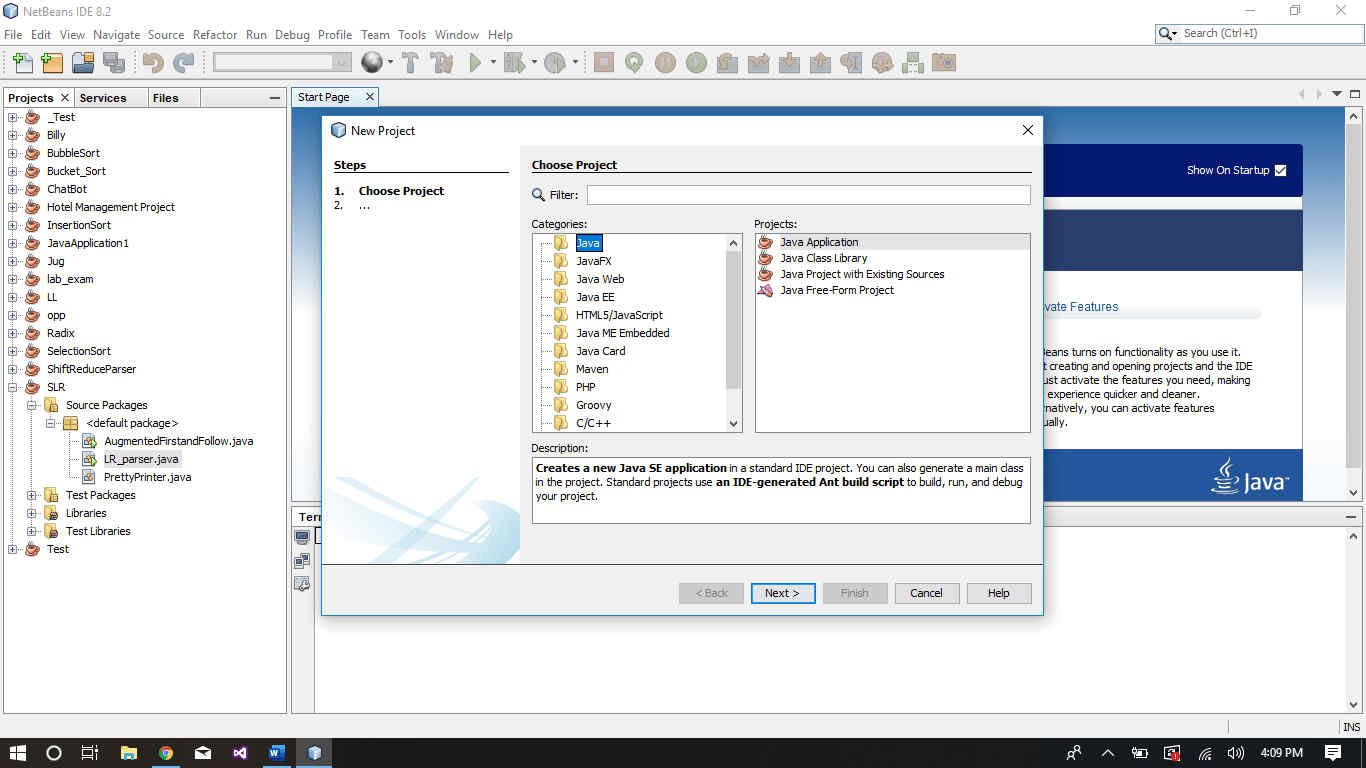
Write the name of the class and then click on the ‘Next’ button.

Step 2:

Now you have to write the code, first, write the following line at the top of the class to import the header file

import java.lang.Math;

Write the following code anywhere you want to find the exponent.

double answer = Math.pow(num, exp);

where num is the number whose exponent you want to find and exp is the raised power(exponent to be found) of that number. Following code is an example of this method:
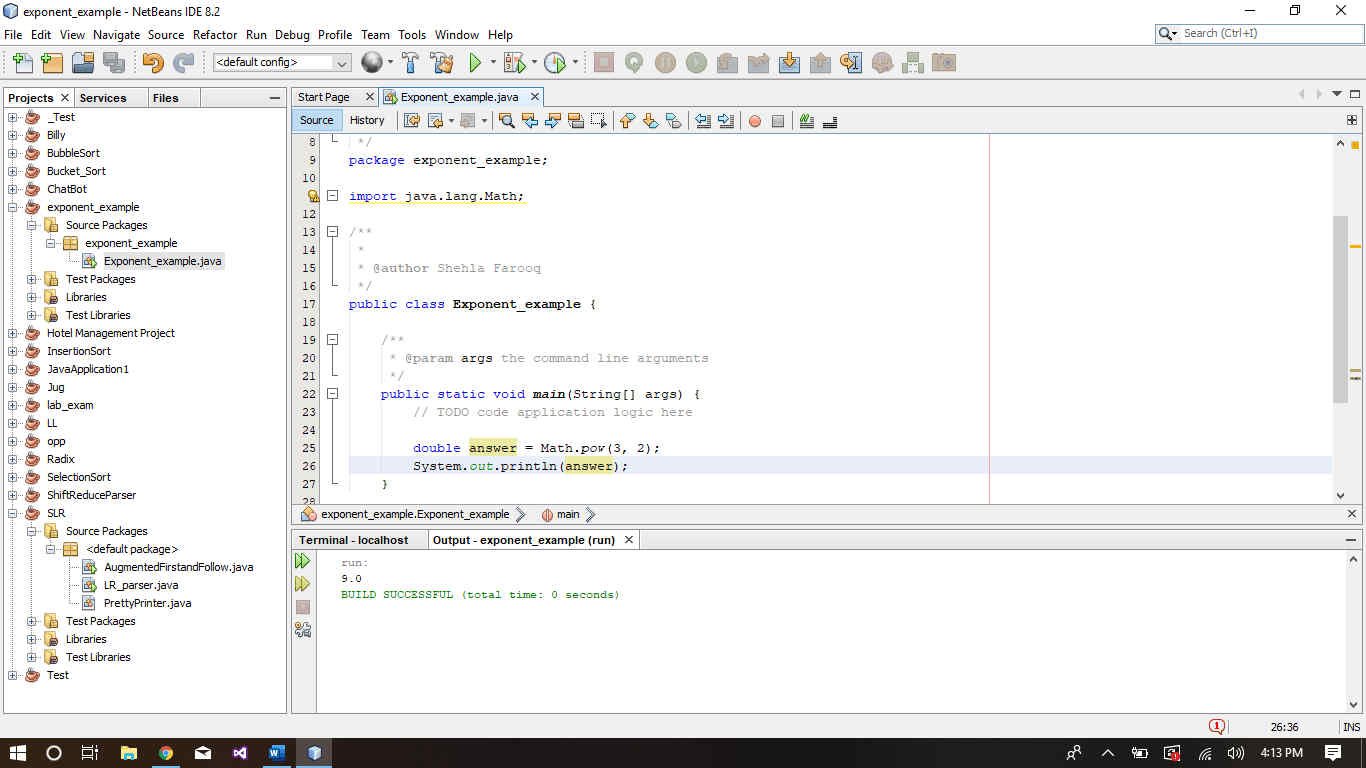
The resulting answer will have the data type double, in order to change the data type, you have to convert the result manually.
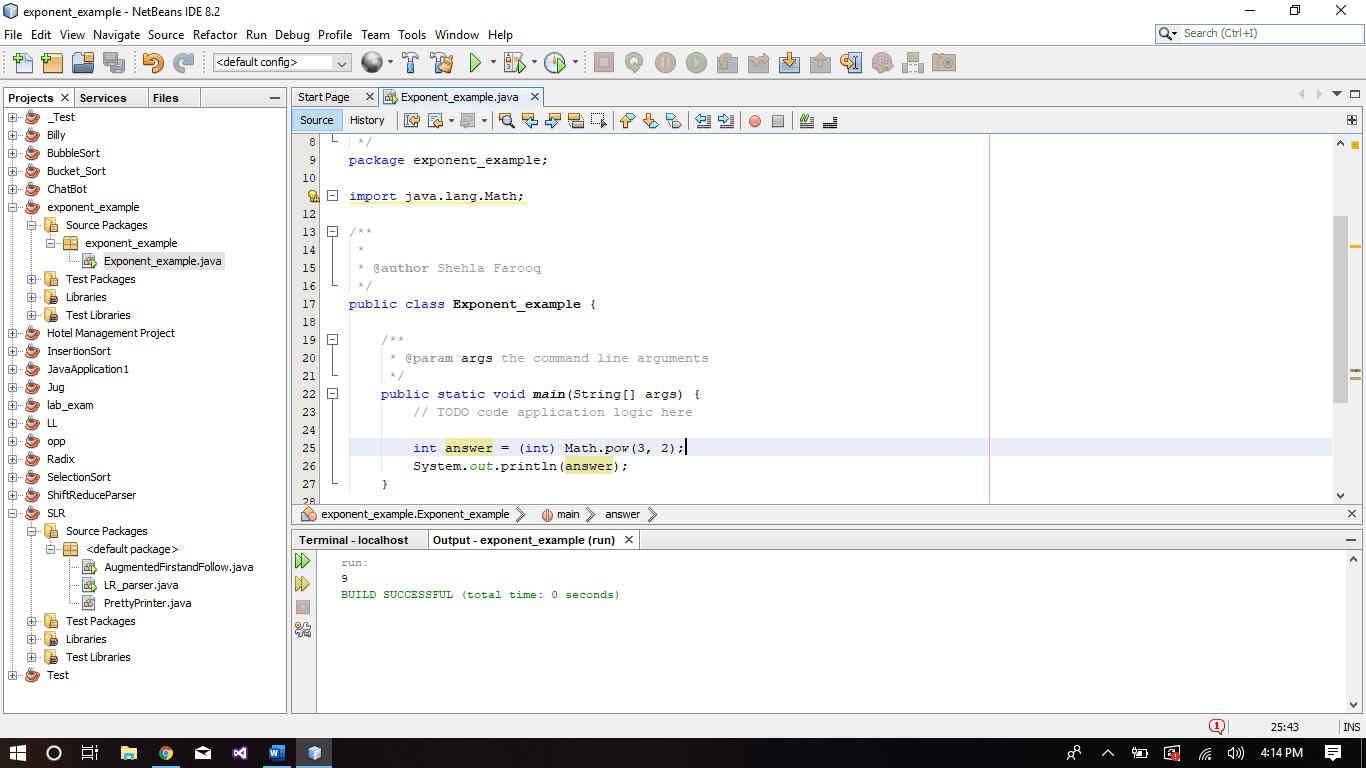
2. How to do Exponents in Java Using for-loop

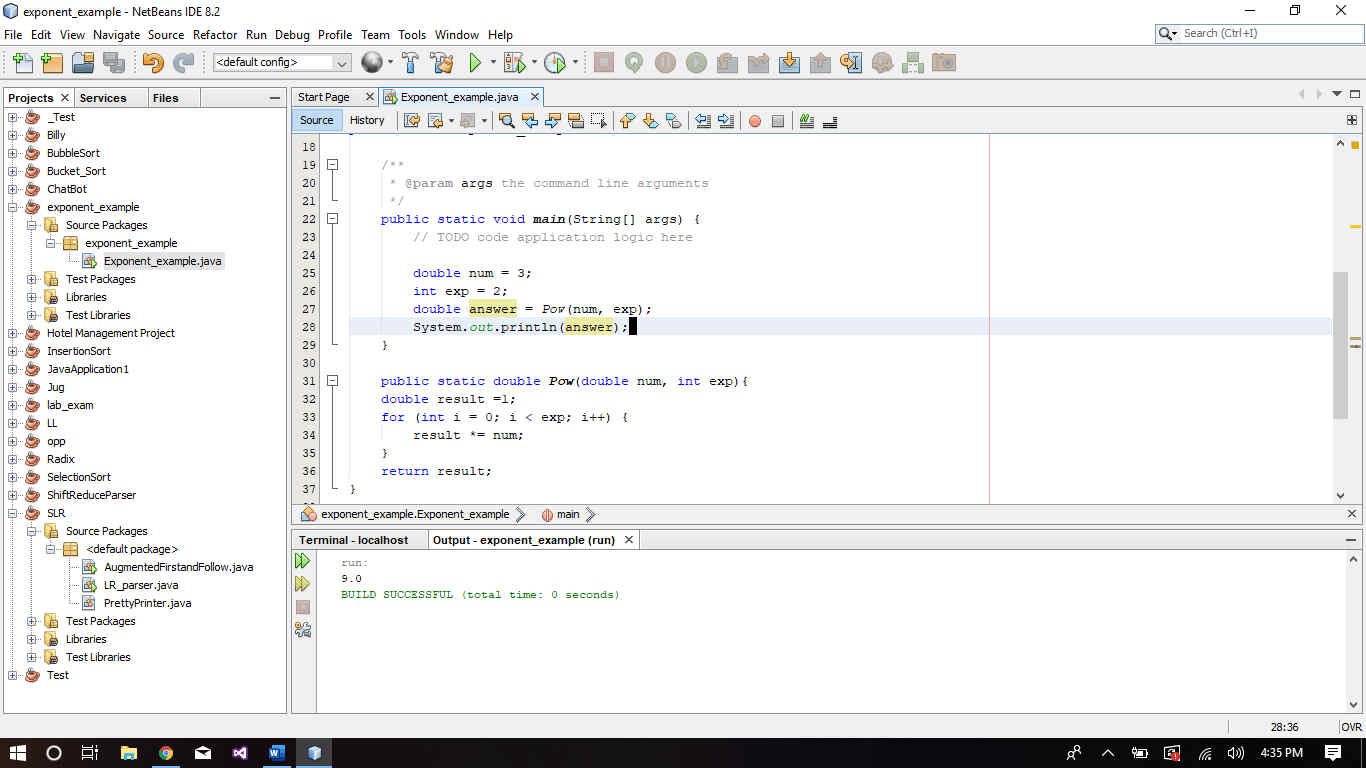
You can also do it by yourself by using a for loop. But this method is only valid for the exponent >= 1.

package exponent_example;
public class Exponent_example {
    public static void main(String[] args) {        
        double num = 3;
        int exp = 2;
        double answer = Pow(num, exp);
        System.out.println(answer);
    }
    public static double Pow(double num, int exp){
    double result =1;
    for (int i = 0; i < exp; i++) {
        result *= num;
    }
    return result;
}
3. Find Exponent in Jave Using Recursive Call

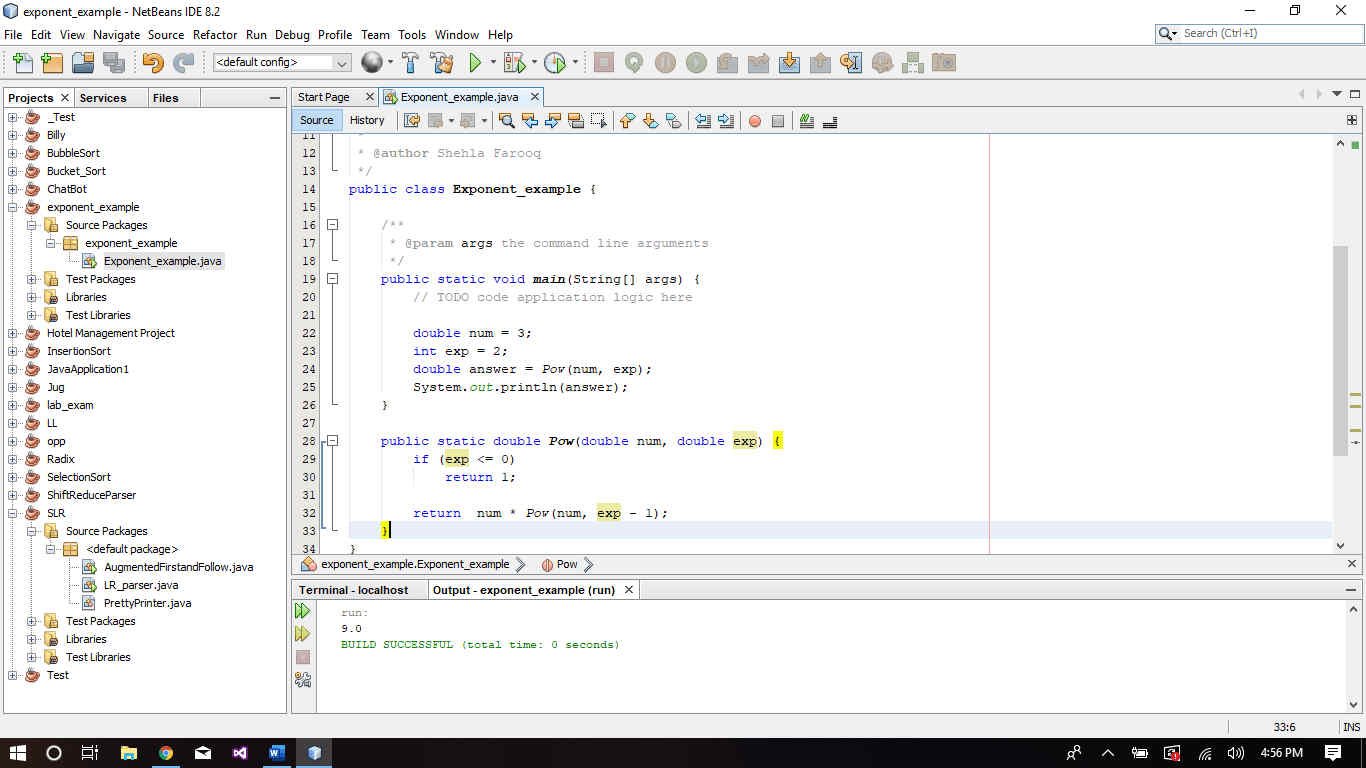
You can also do it by using a recursive call.

package exponent_example;
public class Exponent_example {
    public static void main(String[] args) {
        double num = 3;
        int exp = 2;
        double answer = Pow(num, exp);
        System.out.println(answer);
    }
    
    public static double Pow(double num, double exp) {
        if (exp <= 0)
            return 1;

        return  num * Pow(num, exp - 1);
    }    
}
Computer Science ics
Share. WhatsApp Facebook Twitter Pinterest LinkedIn Tumblr Email
Khurram Farooq
  • Website
  • Facebook
  • Twitter

I'm a full-stack developer, specializing in the PHP, JS, Wordpress, MEAN Stack, MERN Stack & Django. I hold a high standard of quality in everything that I do.

Related Posts

Different Types of Processors And Their Features

January 12, 2020

Computer Science 2nd year 2020 Paper Scheme | Punjab Board

January 3, 2020

Fibonacci Series – C Program

March 5, 2016

2 Comments

  1. M.Azaan on February 11, 2020 5:36 pm

    how to install JAVA

    Reply
  2. sulaiman khan on October 11, 2020 3:36 pm

    dear sir i am sulaiman khan from islamabad i want to contect you i need some question for many website i mean java c/c++
    my wattsap number is 00923176180206

    Reply

Leave A Reply Cancel Reply

RECENT POSTS

NADRA Islamabad Announced Latest April Jobs 2024

April 4, 2024

TEVTA Sargodha Announced Instructor / Clerk Jobs 2024

April 4, 2024

BPSC Announced Latest Jobs Through Advertisement no. 03/2024

April 4, 2024

All Subjects 12th Class Paper Scheme 2024 | Punjab Board

April 4, 2024
TRENDING THIS WEEK

Cambridge CAIE Announced Revised A-Level Exam Schedule 2023

May 23, 2023

Top 7 CSS Academies in Pakistan | List Of Best CSS Academies

October 23, 2019

BISE Lahore Board HSSC-II (12th Class) Result Gazette 2022

October 20, 2022
ABOUT US

Notes, Guess Papers, Old Papers, Jobs, Admissions, Results, Datasheets and everything else that falls into the wide world of education & careers. For any assist and query please contact us.

Home · About Us · Team · Contact · Advertise · DMCA Policy · Cookies Policy · Privacy Policy
© 2013-2025 Powered By FScOnline - Made with ♥ for the students of Pakistan.

Type above and press Enter to search. Press Esc to cancel.

Exit mobile version
We use cookies to ensure that we give you the best experience on our website. If you continue to use this site we will assume that you are happy with it.OkPrivacy policy